Guide
Free Green Screen Remover
Short answer: “free” is not one claim, it is four, and a tool can be free in the first sense while charging you in the other three. It is free to open, free to download from, free at full size, and free without an account — and those are separate promises. Almost every disappointment with a free image tool comes from checking only the first one. The four checks below take about thirty seconds on any tool, including this one.
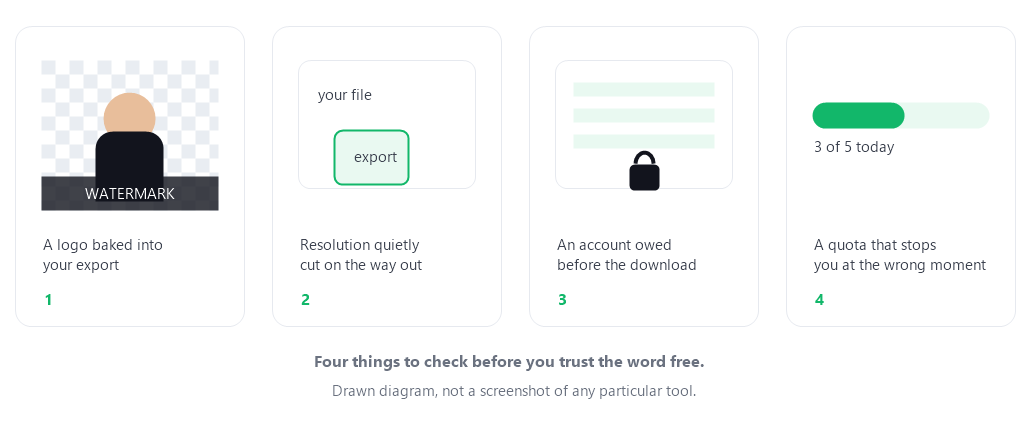
Free is four separate claims
Read the next sentence slowly, because it is the whole page: a tool that lets you upload for free has promised you almost nothing. The part that matters happens at the other end, when you try to take your result out.
1. Free to open
The weakest version of the claim. The page loads, you can pick a file, you can watch the result appear. This is the point where most people stop checking, and it is exactly the point where a tool has spent nothing on you yet. Everything expensive for the operator — bandwidth, compute, storage — happens after this.
2. Free to download
Check what actually arrives when you press download. A watermark is the old trick, and it is not always a badge in the corner: it can be a small mark, a shifted crop, an added border, or a colour profile that makes the file subtly wrong. Watermarks are easy to miss at fit-to-window size, which is why the export has to be opened at 100% before you judge it.
3. Free at full size
This is the quietest one, because nothing warns you. The cutout looks perfect on screen and the numbers are wrong: the file you loaded was 4000 pixels wide and the file you saved is 800. Nothing on the page said “reduced”. If a service is running the work on its own servers, shrinking the output is the cheapest way to make a free tier sustainable, and it costs you the resolution you needed. Compare the pixel dimensions of your input and your output — not the visual, the dimensions.
4. Free without an account
Some tools are free in every sense above but ask for an email first. That is not a scam and it is a legitimate trade, but it changes what you have agreed to: your address is now part of the product. The practical question is whether the account is needed to do the work or only to hand you the file — and whether you would still use the tool if you knew the address would be used to bring you back.
The thirty-second test
Do this on any tool before you trust it with a photo you care about. It works the same way on this one.
- Load one image and export it without signing in. If a form appears between the preview and the file, you have found claim four.
- Open the export at 100% and look at the corners and the edges. A watermark hides in plain sight at fit-to-window size.
- Compare pixel dimensions, not looks. The exported file should report the same width and height as the one you loaded.
- Do it twice in a row with two different images. If the second one is refused, you have found a quota, and you have found it before you depended on the tool.
None of these four checks requires a paid account anywhere, and all four can be finished before your coffee gets cold. The point is not that any particular answer is wrong — a paid tier is a fair way to run a tool — the point is knowing which one you are using.
Why no tool can be free for nothing
Every image tool costs money to keep running. If the pixel work happens on someone else's server, the bill scales with the number of images and their size, and it scales forever. That cost has to come back from somewhere, and there are only a few honest places it can come from:
- You pay directly, through a subscription or a one-off credit. Clear, and usually the best experience.
- An advertiser pays, and you pay with attention and with whatever the ad network is allowed to record about your visit.
- Your data pays, which in this category usually means the images themselves, or an email address, or a usage history.
- Nobody pays, and the limits do — the watermark, the downscale, the quota. This is the one that surprises people, because it is the only business model that is deliberately quiet about itself.
There is a fifth option, which is what this page does: make the work itself cheap enough to give away, by running it in the visitor's own browser instead of on a server. If the pixels never travel, there is no per-image cost to recover, and the honest way to pay for the rest — the domain, the hosting of these plain files — is to say so in advance and let you decide.
What free means on this site, exactly
Statements you can check in the tool, one by one, without asking anyone:
- No watermark. The PNG you download is written straight from the canvas you were looking at. There is no badge to remove and no “upgrade to remove” path.
- No downscale. The export is written at the exact pixel dimensions of the file you loaded. Nothing is resized on the way out.
- No account. There is no sign-in, no email field, and no newsletter. Nothing on the page asks who you are.
- No upload. Your photo is decoded by your browser and processed in the page. There is no server on this site that receives images, which is why closing the tab is the only cleanup needed.
- No quota. There is no counter and no daily limit, because serving you the page costs the same whether you process one image or twenty.
- No batch and no video. This one is a limit, not a boast: the tool handles one still image at a time and cannot process video. Saying so costs us nothing and saves you a wasted upload.
How the rest is paid for: this site is free today and plans to display third-party advertising to cover hosting. That plan, what the ad providers would be allowed to do, and the two counting scripts currently on the site are all written out on the privacy page — rather than discovered later.
Questions people ask about free image tools
Is a free green screen remover worse than a paid one?
Not automatically, but the question is the wrong shape. Ask what the free version removes: a paid tier that lifts a batch limit is a fair deal; a paid tier that removes a watermark is a paywall wearing a free-tool costume. Judge the export, not the price.
Why would a tool give this away for nothing?
Because in this category the work can be genuinely cheap. If the removal runs inside your browser, the operator pays for a few kilobytes of HTML and JavaScript per visit rather than for image processing per image. That is a business model that can honestly support a free tool; server-side processing usually cannot.
How can I tell whether my export was downscaled?
Open the file's properties or your editor's image information and read the width and height, then compare them with the original. Do not judge by how it looks on screen — a downscaled cutout looks completely normal until you place it in a layout that needs the real size.
Do I have to give my email address anywhere?
Not on this site. There is no account and no form. If you want to report a problem, the contact page gives you an address you can choose to write to — it is not a gate in front of the download.
Will this site ever stop being free?
I cannot promise the future, and a page that claims to would be worth less than one that does not. What can be stated is the current design: nothing here requires an account or a payment, and if that ever changes, the honest version of this page is that the change gets written at the top of it rather than in a pricing link.
Does it work on a phone, and is that free too?
Yes to both. The layout is built for narrow screens and the file picker opens your photo library. Big photos are slower on a phone because your own device is doing the work — which is also the reason there is nothing to charge you for.
Green screen removal online, free — what that combination can honestly mean
Those three words together ask a narrower question than they look: not “is there a free tool”, but “can green screen removal be done online and still be free”. The word doing the damage is online, because it hides a fork in the road. Either the image travels to somebody else’s computer, or the removal happens in the page on your own. Same browser, same web address, two completely different bills behind them.
When the file travels, the operator pays per image, per megabyte and per minute, and that has to be covered somehow. It is the real source of the limits you meet everywhere in this category — a daily quota, a reduced export size, a watermark, an account. Those are not greed and they are not a scam either; they are the receipt for processing somebody else’s images on your behalf. When the removal happens inside your browser instead, there is no per-image cost to recover, which is exactly why a free version can still hand back the full-resolution export.
One thing worth untangling before you compare tools: a page can be online in the sense that you reached it over the internet and still do all of its work locally. Those are not opposites. The only distinction that matters is whether your file leaves your device — and that is something you can watch happen, or refuse to let happen, on the very first image you process.
Open the green screen remover — free, no account, no watermark, full-resolution PNG. If you want the explanation behind the export rather than the business model, start with which colour to key on or why the edge looks wrong.